
Advanced React State Boundaries in a Real Next.js App
I had a mostly static Next.js app, so I tried to build it the Next.js way: render as much as possible on the server, keep the client small, use RSC where it helped, and let the URL carry state when that made the page easier to share and restore.
That worked well, but the interesting problems started at the boundaries. A popover needed to close when the URL changed. A share button depended on a browser-only API. A detail view needed to react to infinite-query cache updates. An RSC auth snapshot had to reach a client subtree. An optimistic update had to stay consistent across RSC output and TanStack Query.
This article is a collection of those boundary decisions. The examples are not advanced because the hooks are obscure. They are advanced because React state, server-rendered data, browser APIs, URL state, and client caches all meet in the same product. The code matters, but the deeper question is always the same: what owns the state, what makes it reactive, and which part of the system should be notified when it changes?
Close a popover after a URL change
This is the smallest boundary in the article: local UI state should reset when URL state changes.
Assume you have a controlled Popover component, Radix UI style: it accepts an open prop and an onOpenChange callback.
The requirement is simple: close the popover whenever the user navigates to a different path. In Next.js, the reactive input for that is usePathname. When the current pathname changes, the component renders again with the new value.
isOpen still needs to be state. It is not derived from the pathname; the user can open and close the popover while staying on the same route. At first glance, we need a small piece of previous-render state so we can detect the transition from one pathname to another.
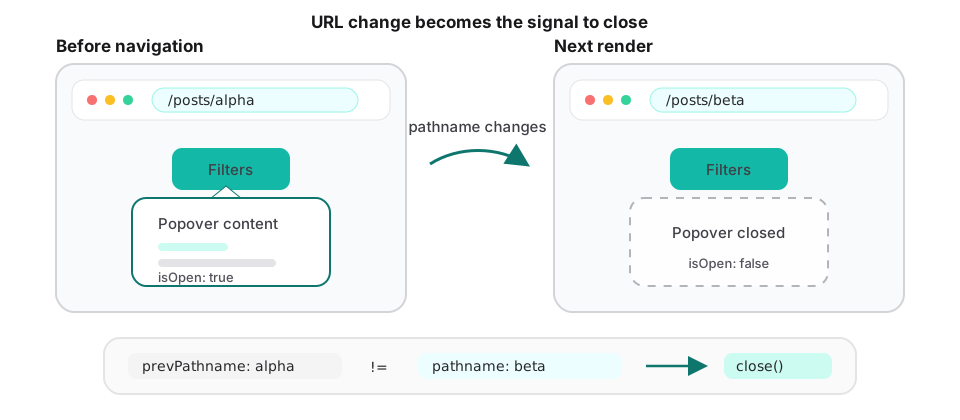
Let’s try to implement it step by step.
v1: Close it in an Effect 👎
function RouteChangeAutoClosePopover(props: { children: ReactNode }) {
  const { children } = props;
  const [isOpen, setIsOpen] = useState(false);
  const pathname = usePathname();

  useEffect(() => {
    setIsOpen(false);
  }, [pathname]);

  return (
    <Popover open={isOpen} onOpenChange={setIsOpen}>
      {children}
    </Popover>
  );
}
This works, and it is probably the version you would find in most codebases. But it corrects the state one committed render too late.
React first renders and commits the new pathname while isOpen is still true. The Effect then sets it to false and schedules another render. The browser may not paint the stale popover, but React still performs an avoidable render-and-commit pass, and the visual result now depends on Effect timing.
The linter flags the same design problem. This is textbook adjusting state when an input changes, so both react-you-might-not-need-an-effect/no-adjust-state-on-prop-change and react-hooks/set-state-in-effect report it.
The deeper issue is that the Effect does not synchronize with anything outside React. The component already knows during render that the pathname changed. The Effect merely delays that knowledge until after the commit.
Aside: What about a key?
If a pathname change should reset the entire subtree, a key expresses that directly:
<RouteChangeAutoClosePopover key={pathname} />This genuinely works, but changing the key recreates the component and everything below it. Child state is lost, focus can be dropped, and the normal closing animation is typically bypassed because the popover is unmounted rather than closed.
A key is the right tool when navigation should reset the whole subtree. Here we only want to change one piece of state, so remounting everything is too broad.
v2: Adjust state during render
My next attempt was to track the previous pathname and close the popover during render whenever the pathname changed. Unlike the Effect-based version, this updates the state before React commits the result, so the popover does not render with stale open state.
This does not violate the Rules of Hooks: the Hooks are still called unconditionally and in the same order. Only the state update is conditional, and no additional Effect is needed.
import { useState } from "react";

export function usePrevious<T extends string | number | boolean | null>(
  value: T,
) {
  const [history, setHistory] = useState<{
    previous: T;
    current: T;
  }>({ previous: value, current: value });

  if (history.current !== value) {
    setHistory({ previous: history.current, current: value });
  }

  return history.previous;
}


function RouteChangeAutoClosePopover(props: { children: ReactNode }) {
  const { children } = props;
  const [isOpen, setIsOpen] = useState(false);
  const pathname = usePathname();

  const prevPathname = usePrevious(pathname);

  if (pathname !== prevPathname) {
    setIsOpen(false);
  }

  return (
    <Popover open={isOpen} onOpenChange={setIsOpen}>
      {children}
    </Popover>
  );
}
The final version: Store the pathname that owns the open state
function RouteChangeAutoClosePopover(props: { children: ReactNode }) {
  const { children } = props;
  const pathname = usePathname();
  const [openedAtPathname, setOpenedAtPathname] = useState<string | null>(null);
  const [isOpen, setIsOpen] = useState(false);

  function handleOpenChange(nextOpen: boolean) {
    setIsOpen(nextOpen);
    setOpenedAtPathname(nextOpen ? pathname : null);
  }

  return (
    <Popover open={isOpen && openedAtPathname === pathname} onOpenChange={handleOpenChange}>
      {children}
    </Popover>
  );
}
Rather than tracking a previous pathname and resetting isOpen, we can store the pathname on which the popover was opened. The popover remains open only while openedAtPathname matches the current pathname. As soon as the route changes, the condition becomes false and the popover closes during the same render.
This models the relationship directly, without an Effect or a render-time state update.
Detect a browser-only API with useSyncExternalStore
This is a browser boundary: the server render needs a safe value, while the real capability only exists in the client.
Assume you want a native share button. window.navigator.share is not available in every browser, and it does not exist during SSR. That means the component needs a value that is safe on the server and accurate in the browser.
useSyncExternalStore is a good fit when React needs to read from something outside React state. In this case the external value is stable after load: either the browser supports the Web Share API or it does not. The subscription can therefore be a no-op, while the server snapshot returns false.
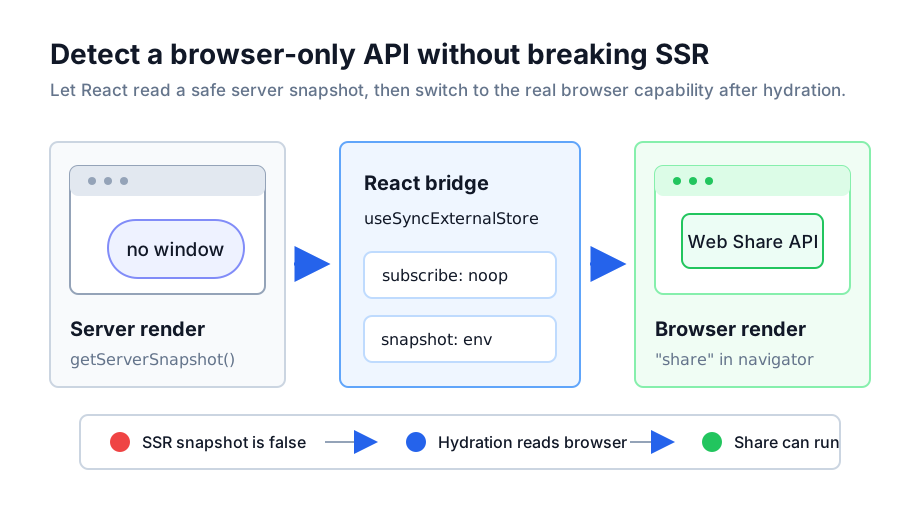
const noop = () => {};

const subscribe = () => noop;

const getSnapshot = () => {
  return "share" in window.navigator;
};
const getServerSnapshot = () => {
  return false;
};

export function ShareButton(props: Props) {
  const { title, text, path } = props;

  const isShareAvailable = useSyncExternalStore(
    subscribe,
    getSnapshot,
    getServerSnapshot,
  );

  function handleShare() {
    if (!isShareAvailable) {
      alert("Your browser doesn't support sharing.");
      return;
    }
    void window.navigator.share({
      title,
      text,
      url: `${window.location.origin}${path}`,
    });
  }

  return <Button onClick={handleShare}>Share</Button>;
}
Derive reactive state from an infinite query
I often store filters in the URL and let TanStack Query keys follow those filters. That gets more complicated when the query is infinite and another part of the page needs to derive information from the already-fetched pages.
Here, the boundary is between a cache read and a reactive subscription.
The concrete case was a master-detail view. The master list was an infinite query: it loaded the filtered items page by page as the user scrolled. The filter itself lived in URL state, simplified here to filterId, and the selected item was also stored in the URL as id. The detail view needed “previous” and “next” links based on the items already loaded in that infinite list.
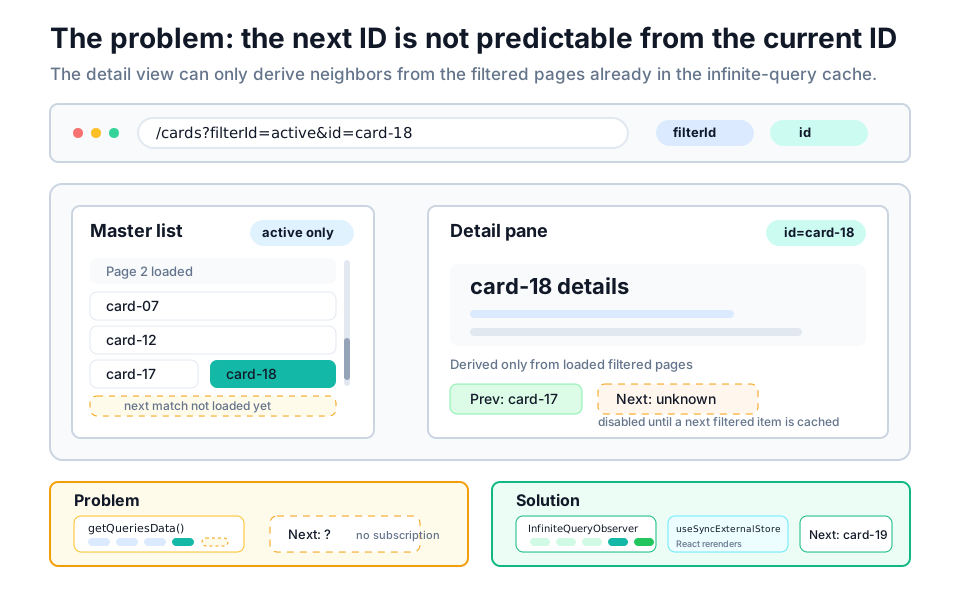
The direct approach is to read the relevant cached query data from the queryClient, flatten the fetched pages, find the current item, and derive the neighboring IDs. TanStack Query gives us getQueriesData, so we can query by key and inspect the cache.
The subtle problem: getQueriesData is a read, not a subscription. If the user is viewing the last currently fetched item, the next ID may not exist yet. After they scroll the list and another page loads, the derived next ID should update, but nothing has told React to render again.
For that, I used InfiniteQueryObserver as the subscription layer and useSyncExternalStore as the React bridge. The snapshot function performs the derived calculation; the observer notifies React whenever the matching infinite query changes. This is not a pattern I would reach for casually, but it is useful when derived UI needs to stay synchronized with query-cache state.
const getServerSnapshot = () => {
  return JSON.stringify({ nextCardId: null, prevCardId: null });
};

/**
 * NOTE: We use the current query client data to fetch the next or previous card IDs.
 * However, due to infinite scrolling, the required data may not always be available.
 */
function useCardPrevAndNextIds(id: string) {
  const queryClient = useQueryClient();

  const [queryStates] = useQueryStates(searchParamsParserConfig);
  const { urlFilter } = queryStates;

  const queryOptions = queryKeys.cards.byFilterId({
    limit: INFINITE_SCROLL_PAGE_SIZE,
    urlFilter,
  });

  const snapshot = () => {
    const queriesData = queryClient.getQueriesData<
      InfiniteData<Awaited<ReturnType<(typeof queryOptions)["queryFn"]>>>
    >({
      exact: true,
      queryKey: queryOptions.queryKey,
    });

    const cards = queriesData.flatMap(([, queryData]) => {
      if (queryData == null) {
        return [];
      }
      return queryData.pages.flat();
    });

    const { nextCardId, prevCardId } = getCardPrevAndNextIds({
      cards,
      id,
    });

    return JSON.stringify({ nextCardId, prevCardId });
  };

  const subscribe = useCallback(
    (onStoreChange: () => void): (() => void) => {
      const observer = new InfiniteQueryObserver(queryClient, {
        enabled: false,
        queryKey: queryOptions.queryKey,
        queryFn: queryOptions.queryFn,
        ...getInfiniteQueryPaginationParams({
          initialPageParam: null,
          limit: INFINITE_SCROLL_PAGE_SIZE,
        }),
      });

      return observer.subscribe(onStoreChange);
    },
    [queryOptions.queryFn, queryOptions.queryKey, queryClient],
  );

  const stringifiedCardIds = useSyncExternalStore(
    subscribe,
    snapshot,
    getServerSnapshot,
  );

  return useMemo(() => {
    const parsedData = JSON.parse(stringifiedCardIds);
    return nextAndPrevCardIdSchema.parse(parsedData);
  }, [stringifiedCardIds]);
}
The server render and hydration pass use an intentionally empty, stable snapshot; after hydration, React switches to the live query-cache snapshot. The observer is disabled because the master list owns fetching. Here, it only notifies this component when that cache changes.
Pass an RSC snapshot into client context
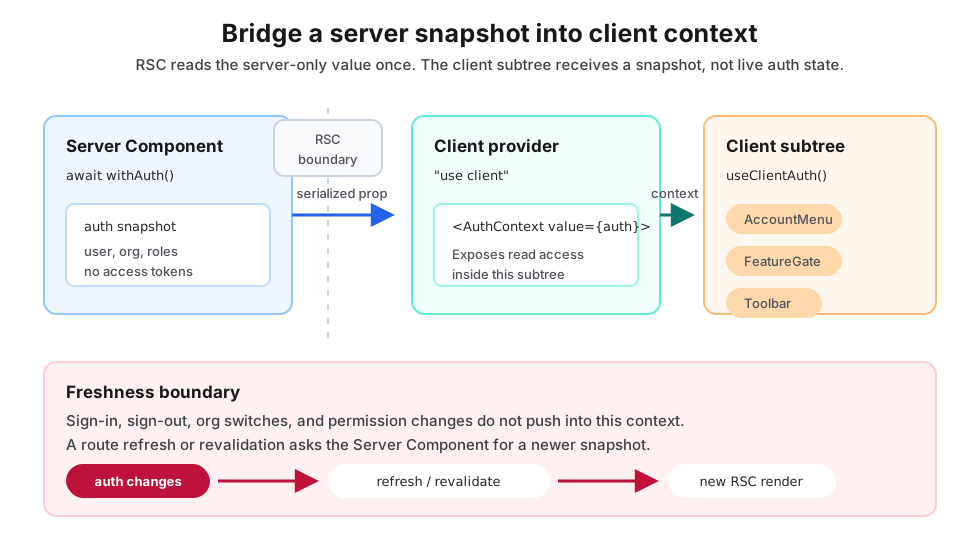
This is a server-to-client boundary, not a live state synchronization mechanism.
Most of the time, I would not recommend using RSC as a way to feed client context. If a library gives you a proper client provider or hook, that should usually be the first choice. Client context is a long-lived interactive surface; RSC data is a request-time snapshot. Mixing the two can make ownership unclear.
That said, I did run into a case where this bridge was useful. At the time, the WorkOS authentication state I needed was available through await withAuth() on the server, while several client components still needed to know about the current user. In that situation, the practical option was to fetch the auth snapshot in a Server Component and pass it into a small client provider.
This is not a general state-management recommendation. It is a compatibility pattern for cases where the source of truth is server-only, but a limited client-side subtree needs read access to the result.
import type { ReactNode } from "react";
import { Suspense } from "react";
import { withAuth } from "@workos-inc/authkit-nextjs";
import { ClientAuthProvider } from "@/components/auth/provider/ClientAuthProvider";

interface Props {
  children: ReactNode;
}

export async function _AuthProvider(props: Props) {
  const { children } = props;
  const auth = await withAuth();

  return <ClientAuthProvider auth={auth}>{children}</ClientAuthProvider>;
}

export function AuthProvider(props: Props) {
  const { children } = props;
  return (
    <Suspense fallback={null}>
      <_AuthProvider>{children}</_AuthProvider>
    </Suspense>
  );
}
Then, in a separate "use client" file, the provider exposes that server snapshot through context:
"use client";

import type { ReactNode } from "react";
import { createContext, use } from "react";
import type { withAuth } from "@workos-inc/authkit-nextjs";

type AuthContextType = Awaited<ReturnType<typeof withAuth>>;

const AuthContext = createContext<AuthContextType | null>(null);

interface Props {
  children: ReactNode;
  auth: AuthContextType;
}

export function ClientAuthProvider(props: Props) {
  const { children, auth } = props;
  return <AuthContext value={auth}>{children}</AuthContext>;
}

export function useClientAuth() {
  const context = use(AuthContext);
  if (context == null) {
    throw new Error("useClientAuth must be used within a ClientAuthProvider");
  }
  return context;
}
The important reservation is that this context is not live auth state. It is the auth value from the server render. If the user signs in, signs out, changes organizations, or updates permissions, the context will only become fresh after the relevant route is refreshed or revalidated.
Today, if the auth library provides a supported client API such as WorkOS AuthKitProvider and useAuth, I would use that instead for client-side auth UI. I would keep withAuth() for server-side concerns: route protection, redirects, server-only data fetching, and permission checks. If I still needed to pass server auth into the client, I would treat it explicitly as an initial snapshot, keep the shape small, and avoid passing sensitive data such as access tokens.
Optimistic updates across RSC and TanStack Query
One mistake I made with Next.js and RSC was betting too hard on the application staying mostly static. Requirements change. A page that starts as server-rendered content may later need infinite scrolling, inline mutations, optimistic feedback, or shared interactive state. I wrote more about that in The Limits of RSC: A Practitioner’s Journey.
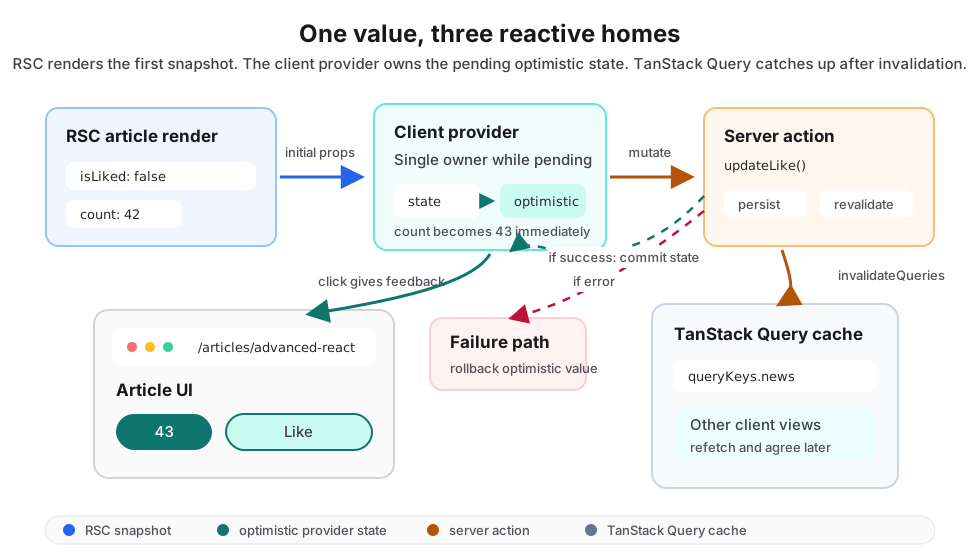
This is where several boundaries overlap: RSC provides the initial value, React owns immediate feedback, TanStack Query owns client caches, and the server owns persistence.
The hard case is an optimistic update for a value that is initially rendered by RSC, while the same value also appears in client-side TanStack Query results. The user should see immediate feedback, the server still needs to persist the change, and every cached view of the data eventually needs to agree.
For a “like” button, I put the optimistic state behind a small context provider. The provider exposes the optimistic count, the optimistic boolean, and the action that performs the mutation. On success, it commits the server result into local state. On failure, it rolls back. It also invalidates the relevant query cache so other client-rendered surfaces can catch up.
"use client";

import type { ReactNode } from "react";
import { createContext, use, useMemo, useOptimistic, useState } from "react";
import { useQueryClient } from "@tanstack/react-query";
import { useAuthSignInModal } from "@/components/auth/AuthSignInModalProvider";
import { useClientAuth } from "@/components/auth/provider/ClientAuthProvider";
import { updateLike } from "@/components/context-stream/like/updateLike";
import { queryKeys } from "@/tanstack-query/queryKeys";
import { useCurrentUrl } from "@/utils/url/useCurrentUrl";

interface ArticleLikeButtonContextProps {
  resourceId: string;
  initialIsLiked: boolean;
  likeCount: number;
  children: ReactNode;
}

interface ArticleLikeButtonContextValue {
  optimisticLikeCount: number;
  optimisticIsLiked: boolean;
  updateLikeAction: () => Promise<void>;
}

const ArticleLikeButtonContext =
  createContext<ArticleLikeButtonContextValue | null>(null);

export function ArticleLikeButtonProvider(
  props: ArticleLikeButtonContextProps,
) {
  const { resourceId, initialIsLiked, likeCount, children } = props;

  const { user } = useClientAuth();
  const { openSignInModal } = useAuthSignInModal();

  const queryClient = useQueryClient();
  const currentUrl = useCurrentUrl();
  const [isLiked, setIsLiked] = useState(initialIsLiked);

  const [optimisticIsLiked, setOptimisticIsLiked] = useOptimistic(isLiked);

  const optimisticLikeCount =
    likeCount +
    (!initialIsLiked && optimisticIsLiked ? 1 : 0) -
    (initialIsLiked && !optimisticIsLiked ? 1 : 0);

  const contextValue: ArticleLikeButtonContextValue = useMemo(() => {
    async function updateLikeAction() {
      if (user == null) {
        openSignInModal({ title: "Sign in to like this article" });
        return;
      }
      const optimisticLikeValue = !optimisticIsLiked;
      setOptimisticIsLiked(optimisticLikeValue);
      const { error, success, isLiked } = await updateLike({
        resourceType: "article",
        resourceId,
        isLiked: optimisticLikeValue,
        currentUrl,
      });

      await queryClient.invalidateQueries({
        queryKey: queryKeys.news.queryKey,
      });

      if (success) {
        setIsLiked(isLiked);
      } else {
        console.error("error", error);
        setOptimisticIsLiked(!optimisticLikeValue);
      }
    }

    return {
      optimisticLikeCount,
      optimisticIsLiked,
      updateLikeAction,
    };
  }, [
    currentUrl,
    optimisticLikeCount,
    optimisticIsLiked,
    queryClient,
    resourceId,
    user,
    openSignInModal,
    setOptimisticIsLiked,
  ]);

  return (
    <ArticleLikeButtonContext value={contextValue}>
      {children}
    </ArticleLikeButtonContext>
  );
}

export function useArticleLikeButtonContext() {
  const context = use(ArticleLikeButtonContext);
  if (context == null) {
    throw new Error(
      "useArticleLikeButtonContext must be used within an ArticleLikeButtonProvider",
    );
  }
  return context;
}
The boundary question
These examples are not about memorizing hooks. They are about choosing the right reactive boundary: which system owns a value, which system can observe it, and which system needs to be told when it changes.
usePathname makes the URL a render input. useSyncExternalStore turns an external source into something React can subscribe to. RSC can deliver excellent initial data, but client interactivity still needs a clear owner for optimistic state, cache invalidation, and shared UI state.
The more advanced the Next.js app becomes, the more important that ownership gets. The hard bugs usually appear when a value has two homes and neither one is clearly responsible for keeping the other up to date.